A study schedule built from your deadlines, not a blank grid.

Most study schedules start with empty boxes and good intentions. A useful one starts with what’s due, how long each piece will take, and the hours you really have between classes. Schedly builds it from those three things.

Free for up to 15 open assignments. Try 2 free syllabus analyses.

Updated

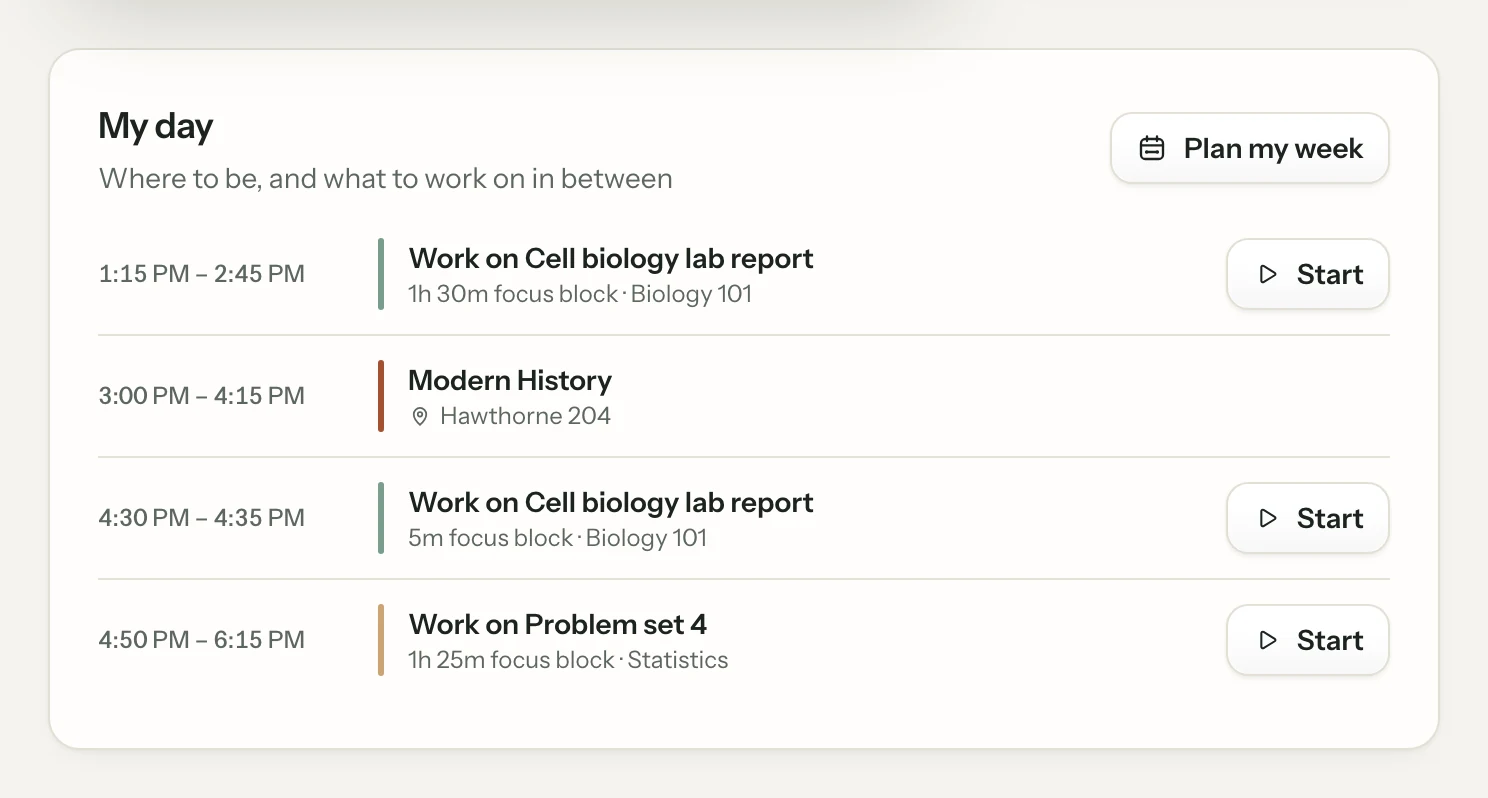
Schedly’s My day view with focus blocks for assignments placed between the student’s classes.Schedly’s My day view with focus blocks for assignments placed between the student’s classes.
Schedly, shown with example data from the product tour
Walk through an example
  • Work is scheduled earliest deadline first, split across days before it’s due.

  • Study blocks fit around your classes, with buffers on either side.

  • Try the free study time calculator, no account needed.

On this page

The three numbers a study schedule needs

  1. How long each assignment will take. Guess in hours, then round up. A first estimate is usually optimistic.
  2. How many hours you can study each day. Not the ideal number: the real one after classes, practice, work, and meals.
  3. When each thing is due, to the hour. Due Thursday at 9 AM means Wednesday is your last full work day.

With those, you can check something most schedules skip: whether the plan is even possible. If the work adds up to 19 hours and you have 15 before the last deadline, no color-coding will fix it. Better to know on Monday than Thursday night.

An example week

Here’s a fictional week for a student with three classes, a problem set, a paper, and an exam, planned the way Schedly’s Plan my week works: earlier deadlines first, bigger work spread across several days, and classes left alone.

Mon

  • Class: Statistics 10:20
  • Study block: Problem set 4 · 1.5h
  • Study block: History reading · 45m

Tue

  • Class: Biology 1:30
  • Study block: Problem set 4 · 1h
  • Study block: Bio exam review · 1h

Wed

  • Due: Problem set 4 due 11:59 PM
  • Class: Statistics 10:20
  • Study block: Bio exam review · 1.5h
  • Study block: Essay outline · 1h

Thu

  • Exam: Biology exam 1:30
  • Study block: Essay draft · 2h

Fri

  • Class: Statistics 10:20
  • Study block: Essay revision · 1h
  • Due: Essay due 5:00 PM
Fictional week. Study blocks avoid class times.ClassStudy blockDueExam

Notice what isn’t there: no block on the essay on Monday, because two earlier deadlines need the time first, and no work on the problem set after Wednesday, because a block never ends after its assignment is due.

How Schedly makes the schedule for you

  1. Set your study window once

    In Settings → Study time and breaks, choose when your study day starts and stops, how many hours you want to study, and your break length.

  2. Let Plan my week suggest blocks

    Schedly places study blocks around your classes and fixed events with 15-minute buffers, earliest deadlines first, and spreads larger assignments across the days before they’re due.

  3. Approve, then follow My day

    Select Save study blocks to my calendar. Nothing goes on your calendar until you do. My day then lays out today hour by hour, and Start begins a focus session.

  4. Replan when things change

    Finish early, fall behind, get an extension: suggestions replan from the current time. If the work can’t fit, Schedly tells you how much won’t, instead of pretending.

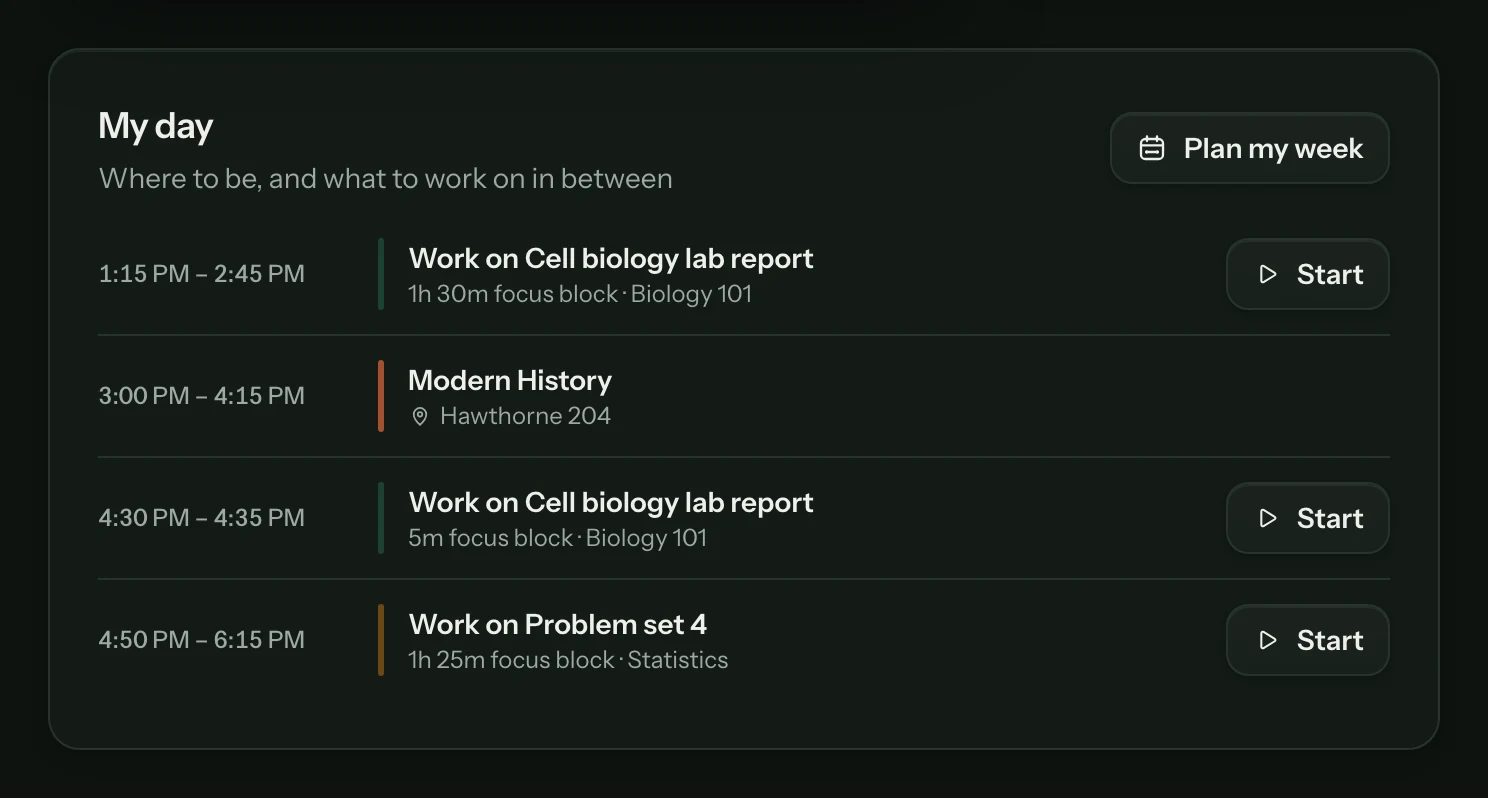
My day in Schedly, showing classes and suggested focus blocks laid out across the day.My day in Schedly, showing classes and suggested focus blocks laid out across the day.
My day, from Schedly’s fictional tour workspace.

Plan my week, My day study blocks, and the focus timer are part of Schedly Pro. On Free, your smart to-do list and Focus now still tell you what to start next, and the calendar shows the next 10 days.

What’s free, and what’s Pro

Start on Free with no card. Upgrade from inside Schedly whenever the semester needs it. See full pricing.

Free $0

Everything you need to keep this week’s work in order.

  • Up to 15 open assignments at a time (finished work doesn’t count)
  • Smart to-do list in due-date order, with the reason on each assignment
  • Focus now, the one assignment to start next
  • Calendar for the next 10 days
  • 2 free EasyAdd Lite syllabus analyses
  • Working links on 2 assignments, plus 3 general and 3 assignment resources
  • Search, and Past work kept for 24 hours
  • Schedly for ChatGPT, with 25 actions a week

Pro $14.99/month or $140/year

Plan the whole semester, with the time blocked out for you.

  • Unlimited assignments and every calendar month
  • Full EasyAdd: syllabi, scanned PDFs, photos, class schedules, and every date in the term
  • Schedule page with your weekly classes
  • Plan my week and My day study blocks, planned around your classes
  • Schedbot, the assistant that answers from your own plan
  • Break it down, the focus timer, and email updates
  • Unlimited Schedly for ChatGPT

Pro’s AI features (EasyAdd, Schedbot, and Break it down) share a weekly AI allowance that resets every Monday. Yearly works out to $11.67/month.

Questions

Does Schedly put study blocks on my calendar automatically?

Only when you approve them. Plan my week suggests blocks, and they’re saved to your calendar when you select Save study blocks to my calendar. Schedly never adds blocks on its own.

What if my work doesn’t fit?

Schedly first spreads work across nearby days and moves later-due work, and it can extend your daily study target. If there still isn’t enough time, it tells you how much cannot fit.

Is the study time calculator free?

Yes, and it doesn’t need an account. It runs in your browser and doesn’t save or send what you enter.

Know what’s due. Know when to do it.

Schedly puts every assignment in order and shows you where to start. Free for up to 15 open assignments. Try 2 free syllabus analyses.